Proxmox VE Dynamic Memory Techniques Explained
Every vendor has its own memory-optimization scheme, all aiming to squeeze the most out of physical RAM!
In virtualization, physical memory is almost always the scarcest resource. CPU can be over-committed (one core serving many), disks can be thin-provisioned, but memory, once handed out, is genuinely occupied. To run more virtual machines on a limited amount of physical RAM, KVM/QEMU (the virtualization engine underneath Proxmox VE) offers two complementary mechanisms:
- Memory Ballooning: dynamically "lends and reclaims" memory between the host and the guests.
- KSM (Kernel Samepage Merging): merges memory pages with identical content across multiple VMs into a single shared copy.
1. KVM Ballooning
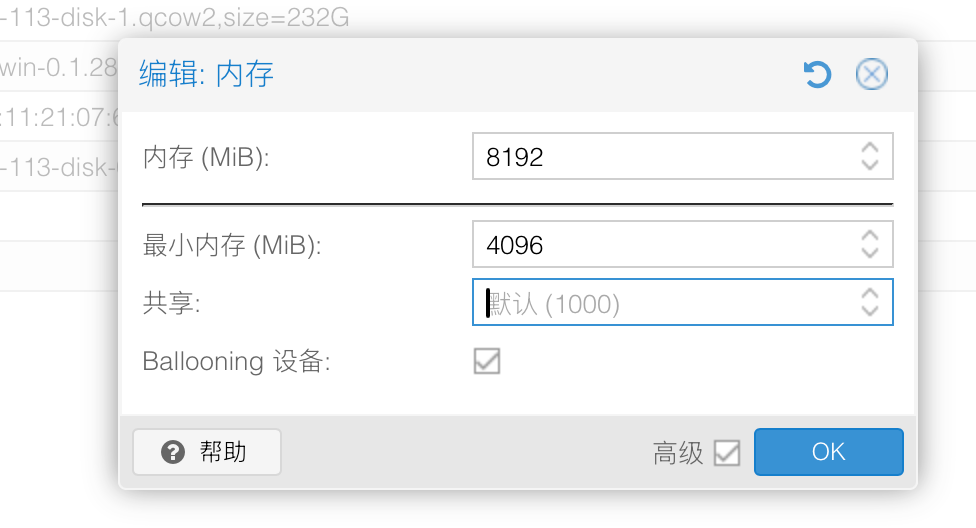
This page should look familiar — it's where you configure a PVE VM's memory.
So what exactly is ballooning?
Memory ballooning is an interface mechanism between the host and the guest, used to dynamically adjust the guest's reserved memory size.
1.1 How It Works
At the heart of ballooning is a kernel driver running inside the guest, virtio_balloon. Picture it as a balloon inside the VM that can inflate and deflate:
- Inflate: When the host runs low on memory, it tells the balloon driver inside the VM to "inflate a bit." On receiving this, the driver "claims" a batch of memory inside the guest — like blowing air into a balloon: the bigger the balloon gets in the room, the less space is left for everyone else in the room (the programs inside the VM). Once it has claimed that memory, the driver tells the host: "Hey! I've taken these blocks, nobody else will touch them, so go ahead and take them back."
- Returning physical memory: The memory the balloon has claimed is no longer usable by the guest's own programs. So the host reclaims this actual physical RAM and hands it to other VMs that need it more, or keeps it for itself. What the balloon holds is just "empty shell addresses" inside the guest — there's no real memory backing them anymore.
- Deflate: When the guest itself needs memory again, the balloon "deflates" and shrinks, releasing the space it had claimed back to the programs inside the VM. As soon as the guest touches these addresses again, the host allocates real physical memory to back them.
The balloon itself stores no data; it merely acts as a "placeholder piston," shuffling memory back and forth between the host and the guest.
The entire process requires no pausing or rebooting of the VM and can adjust each VM's available memory at runtime.
1.2 Automatic Ballooning in Proxmox VE
In Proxmox, ballooning is enabled whenever the "Minimum memory" you set is lower than the "Memory (maximum)":
- Maximum memory: what the VM gets at boot, and the upper bound of what it can use.
Note: the VM grabs the full maximum at boot — it does not take only as much as it currently uses.
- Minimum memory: the lower bound the VM can be squeezed down to under pressure. Proxmox guarantees it will never take more memory away than this floor allows.
The pvestatd daemon periodically monitors host memory usage and tries to keep it around a target level (default 80%). This 80% is adjustable — it's the default value of the node configuration option ballooning-target and can be changed at the node level.
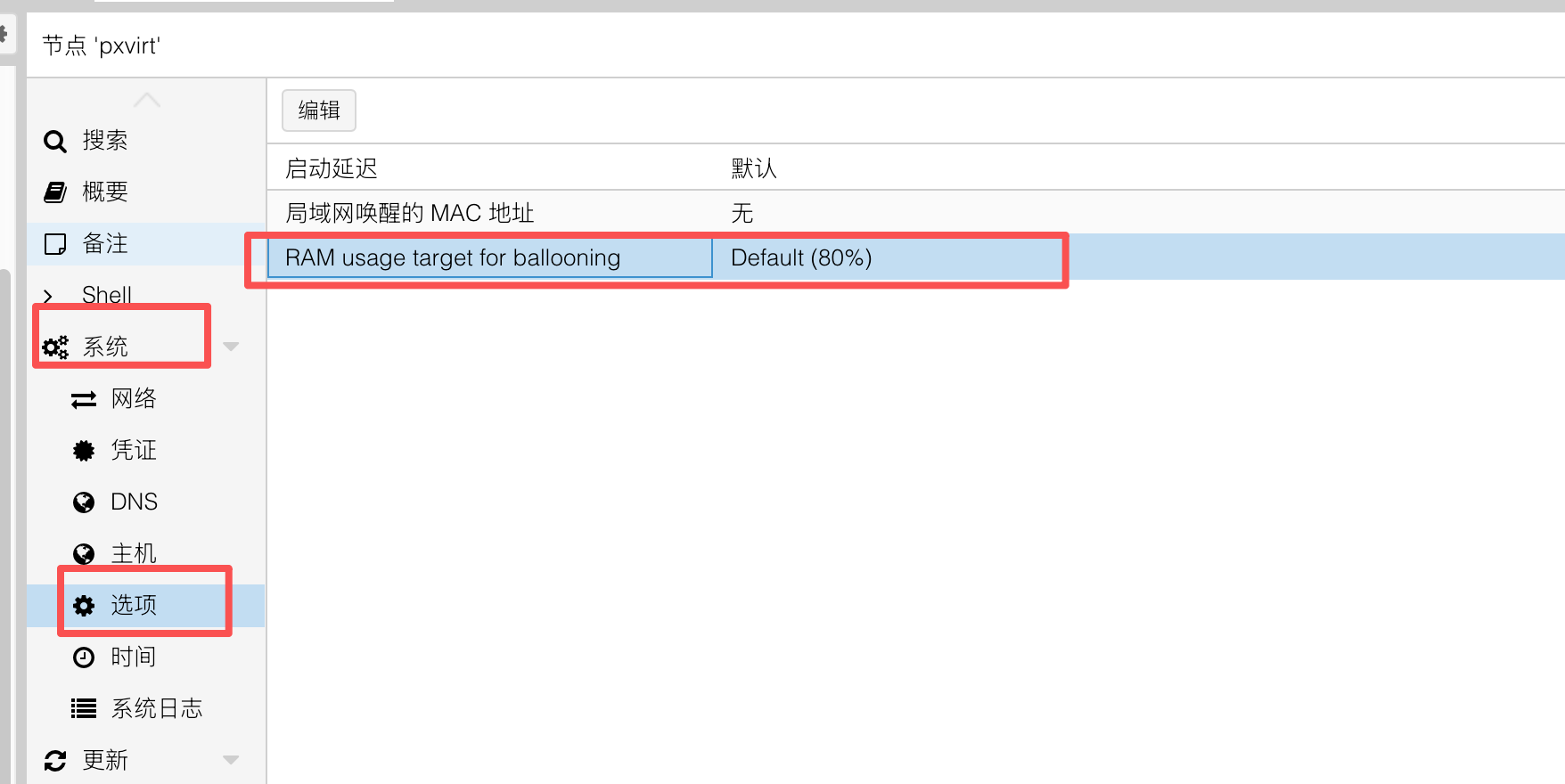
The code logic looks like this:
# Goal: keep host memory usage at "target" (default 80%)
my $target = int($config->{'ballooning-target'} // 80);
# goal = amount of change needed; positive means we can grow, negative means we must reclaim
my $goal = int($hostmeminfo->{memtotal} * $target / 100 - $hostmeminfo->{memused});- When host memory usage is below the target (
goalis positive), it gradually grows the guests' memory up to their maximum; growth prioritizes VMs under memory pressure. - When host memory usage is above the target (
goalis negative), it starts reclaiming memory from balloon-enabled VMs (inflating); reclamation starts with VMs that have plenty of free memory. - When the absolute value of
goalis within ±10 MB, no adjustment is made (a dead zone), and each VM changes by at most 100 MB per cycle (maxchange) to avoid violent memory thrashing.
The actual distribution is handled by compute_alg1 in /usr/share/perl5/PVE/AutoBalloon.pm (on the openEuler build: /usr/share/perl5/vendor_perl/PVE/AutoBalloon.pm). It allocates proportionally according to each VM's shares (weight, default 1000): every VM first gets its guaranteed "minimum memory," and the portion above the minimum is then divided up in proportion to shares:
my $shares  = $d->{shares} || 1000;
my $desired = $d->{balloon_min} + int(($alloc_new / $shares_total) * $shares);
Setting a VM's shares to 0 excludes it from automatic ballooning entirely (it keeps its full memory). VMs without a balloon driver, without a minimum memory set, or currently migrating are also skipped.
You can also manually test ballooning from the VM's Monitor tab with the command balloon <target_memory_in_MB>, which makes the balloon driver try to converge to the specified size.
1.3 The Balloon Also Reports Memory Statistics
Beyond "lending and reclaiming" memory, the virtio-balloon device can report the guest's memory statistics to the host, helping the host schedule more accurately. By calling the qemu-ga communication interface, it obtains accurate memory data from inside the guest.
This is also why a system without qemu-guest-tools installed can show the inconsistency where the memory panel reports 80% usage while the VM's internal memory usage is only 20%!
1.4 Behavior and Symptoms
Under normal load, ballooning overhead is negligible (typically < 3% CPU). With ballooning enabled, an idle VM's memory footprint can drop by about 40–60%, letting the same hardware run roughly 30% more VMs (often more).
But when the host is genuinely short on memory and the balloon is aggressively inflated, a chain of "memory pressure" symptoms appears. Fundamentally, the host is making performance trade-offs on the guest's behalf with incomplete information — it only sees "pages," not which pages are "hot" to the application:
- Cache gets flushed first: The guest kernel first reclaims file cache, so workloads that rely on cache hits (databases, file servers) suffer a sharp performance drop.
- Swap kicks in: Once the cache is gone, reclamation pushes into the working set, triggering swap inside the guest — application latency becomes jittery and unpredictable.
- OOM risk: If ballooning is too aggressive and the minimum memory is set too low, the guest's internal OOM Killer may fire and kill important processes (the database itself is often the highest-scoring "victim").
So in practice, always: set a sensible minimum memory floor so that once the floor is reached no more can be taken, keeping the guest stable and avoiding OOM. For latency-sensitive or database workloads, it's recommended to disable ballooning outright, size memory explicitly, and leave the host plenty of headroom.
1.5 A Few Important Limitations
- The guest must have the balloon driver installed. Linux guests usually include
virtio_balloonbuilt in; Windows guests need the VirtIO drivers. Without the driver, the balloon device does nothing. - Ballooning is incompatible with PCI passthrough (PCI passthrough / VFIO), because passed-through devices require fixed memory addresses.
- The guest cannot reclaim memory on its own until the host deflates the balloon, so once over-inflated, recovery has a delay.
2. KSM (Kernel Samepage Merging)
If ballooning solves "give back the memory you're not using," then KSM tackles a different problem: across many VMs there are tons of memory pages with identical content (the same OS, the same libraries, the same runtime) — why store so many copies? The boss says it's far too wasteful, fix it!
KSM (Kernel Samepage Merging) is a memory-deduplication feature in the Linux kernel. It lets the host merge physical pages with identical content across multiple processes or VMs into a single shared page.
2.1 How It Works
Think of a building with 10 residents, each holding an identical copy of the same dictionary. Instead of letting each one take up a shelf slot, you merge all 10 into 1 copy on a shared shelf — whoever needs to look something up consults the same copy, saving the space of 9 books. KSM does exactly this, except the "dictionaries" are memory pages — somewhat like ZFS deduplication.
Inside the host there's a background service (the kernel thread ksmd) that repeatedly scans VM memory and does three things:
- Find which memory can participate in merging: VM memory is marked in advance as "available for comparison and merging" (this step is done by QEMU when it allocates the memory).
- Compare content page by page:
ksmdcompares this memory one page at a time, looking for pages whose content is byte-for-byte identical (e.g., multiple VMs that have loaded the same system files or the same libraries). - Merge into one copy: Once identical pages are found, it keeps only one real copy in memory, points all the original pages at that single copy, and frees the surplus memory for use elsewhere.
KSM uses Copy-on-Write (COW) protection: shared pages are read-only. When a VM wants to modify such memory, the moment anyone tries to write, the system immediately makes a private new copy for it to change, leaving the shared page untouched. The entire merging process is completely transparent to the VM — no data is mixed up or lost.
2.2 Key Parameters (under /sys/kernel/mm/ksm/)
run:1= run ksmd;0= stop scanning but keep already-merged pages;2= stop and unmerge all merged pages.pages_to_scan: how many pages to scan before ksmd sleeps (Proxmox default ~100).sleep_millisecs: how many milliseconds ksmd sleeps between scans.merge_across_nodes: whether to allow merging across NUMA nodes. When disabled, KSM only merges pages residing in the same NUMA node, avoiding cross-node access latency.
Monitoring metrics:
pages_shared: how many "shared pages" are actually in use (i.e., the physical pages retained after merging).pages_sharing: how many mappings are sharing those pages (the larger this number, the more memory saved).pages_unshared: pages that are unique but are repeatedly re-checked for merging.pages_volatile: pages changing too fast to be placed in a tree.full_scans: how many times all mergeable regions have been fully scanned.
2.3 KSM and ksmtuned in Proxmox VE
Proxmox uses the ksmtuned service to dynamically tune KSM on demand, rather than scanning at full speed all the time. Check its status with systemctl status ksmtuned. Its default config (/etc/ksmtuned.conf) is driven by these key parameters:
KSM_THRES_COEF=20: KSM only kicks in when host free memory drops below 20% of the total.KSM_NPAGES_BOOST=300: when free memory is below the threshold, add 300 to the pages scanned per pass to speed up dedup.KSM_NPAGES_DECAY=-50: when free memory is above the threshold, subtract 50 from the pages scanned per pass, gradually slowing down.KSM_NPAGES_MIN=64/KSM_NPAGES_MAX=1250: the lower and upper bounds on pages scanned.KSM_SLEEP_MSEC=10: the baseline scan interval.
In other words, when the host has plenty of free memory KSM is essentially idle; only when memory pressure rises does it gradually ramp up merging.
2.4 Behavior and Symptoms
KSM's payoff is substantial in scenarios with "many similar VMs," especially VMs cloned from a template.
The cost is CPU: ksmd scanning and comparing memory burns CPU — it's fundamentally "trading CPU for memory." That said, newer kernels introduced Smart Scan — if a page failed to merge on a previous pass, it's skipped on the next one, significantly cutting wasted scanning overhead.
Important: KSM is incompatible with HugePages. KSM can only merge ordinary 4KB pages; it will not scan and cannot merge huge pages (HugePages, commonly 2MB / 1GB pages). So if you enable huge pages for a VM (e.g., set the
hugepagesoption in PVE, or back it with hugetlbfs / 1G static huge pages to run databases, DPDK, etc.), that memory is "invisible" to KSM and gains essentially no merging benefit.HugePages and KSM are two opposite optimization paths:
- HugePages chase "performance first" — larger pages reduce TLB misses and improve memory access efficiency, at the cost of memory being locked in large blocks and being inflexible;
- KSM chases "density first" — finer-grained dedup to save memory, at the cost of CPU spent scanning.
Their goals and granularities are inherently at odds. So either enable huge pages for high-performance workloads (and drop any KSM expectations for that VM), or enable KSM for high-density scenarios (and don't use huge pages) — don't expect to have both on the same block of memory. Transparent Huge Pages (THP) fare slightly better — the kernel can split a THP back into small pages to participate in KSM — but explicitly allocated static huge pages cannot be merged at all.
2.5 Security Considerations
KSM introduces a cross-VM side-channel risk: because merged pages are copy-on-write, the first write to a page that "happens to match another VM's page" is slower than writing a normal page (because it triggers a COW copy). An attacker can exploit this timing difference to infer, from one VM, whether another VM on the same host is running a particular piece of software, a particular version, or even whether certain files exist.
- As early as 2011, Suzaki et al. used KSM to identify user data and software in co-resident VMs on KVM.
- The issue is tracked as CVE-2021-3714; memory deduplication can also be used to facilitate Rowhammer-style attacks.
For this reason, Proxmox officially recommends: only enable KSM when you control all the VMs on the host; in multi-tenant / public-cloud environments that require tenant isolation, KSM should be disabled to strengthen isolation.
How to disable KSM:
- Stop the service at the node level:
systemctl disable --now ksmtuned - Unmerge already-merged pages:
echo 2 > /sys/kernel/mm/ksm/run
Summary
| Dimension | Memory Ballooning | KSM Page Merging |
|---|---|---|
| Problem solved | Return a VM's temporarily-unused memory to the host / other VMs | Merge identical pages across VMs into one copy |
| Who decides | Host issues the order; the guest chooses which pages to release | Host kernel scans and compares; transparent to the guest |
| Trigger (PVE) | Host memory usage exceeds 80% | Host free memory drops below ~20% |
| Main cost | Guest cache flush, swap, OOM risk | Extra CPU overhead, cross-VM side-channel risk |
| Dependencies | Guest needs the balloon driver; incompatible with PCI passthrough | More benefit the more similar the VMs; incompatible with HugePages |
| Key advice | Set a minimum memory; disable ballooning for critical/database VMs | Only enable in single-tenant, trusted environments |
The two can be enabled together and complement each other: ballooning handles the "macro" task of shifting memory between VMs, while KSM handles the "micro" task of eliminating duplicate pages. Either way, it's recommended to keep ample memory headroom on the host and to tune latency- and memory-sensitive critical workloads specifically, to avoid performance collapse or OOM under heavy memory pressure.
References
- Dynamic Memory Management - Proxmox VE Wiki
- Kernel Samepage Merging (KSM) - Proxmox VE Wiki
- Kernel Samepage Merging — The Linux Kernel documentation
- Kernel same-page merging - Wikipedia
- Memory ballooning and virtio_balloon driver in qemu-kvm — Humble Devassy Chirammal
- Virtio balloon — Richard WM Jones
- VirtIO Memory Ballooning — pmhahn
- Virtio balloon memory statistics — QEMU documentation
- Projects/auto-ballooning — linux-kvm.org
- 20.19. Memory Balloon Device — Red Hat RHEL 6 Virtualization Administration Guide
- Proxmox: The 'Ballooning' Setting That Creates Fake Memory Pressure — cr0x.net
- How Does Ballooning Work in Proxmox for Dynamic Memory Management? — Vinchin
- Proxmox Memory Management: Ballooning, KSM, NUMA, and Overcommit — ProxmoxR Blog
- Evaluate KSM and Ballooning features in Proxmox VE — credativ
- 8.4.2. The KSM Tuning Service — Red Hat RHEL 6 Virtualization Tuning and Optimization Guide
- Chapter 7. KSM — Red Hat RHEL 6 Virtualization Administration Guide
- virtio-balloon: add support for free page reporting (v21) — QEMU devel
- Memory Deduplication as a Threat to the Guest OS — KTH DiVA